Archive
XNA Ray Picking Sample
Edit : The article is archived!, please refer to the my XNA Picking Tutorial
Hello! 🙂
This is a simple XNA 3.1 app that I wrote to demonstrate how picking 3D objects works :)…
Make sure you first check the official picking sample, you can find it here (XNA GS4).
Okay back to my app…
What makes my sample different is that you can actually see the camera frustum & the mouse ray, here’s a screen shot:

as you can see there are three viewports here:
1- Right : The main game scene, camera used : camera1…
2- Left : in this viewport the whole scene is rendered again and can be seen using a second camera (camera2), camera1 is visualized here, camera1 frustum, near/far planes and mouse ray are all rendered here so that you can see how picking works ;)…
3- Bottom : Instructions & info.
Both cameras are free look cameras similar to Counter-Strike free look cameras…
Here are the files:
RayPickingSample Executable
RayPickingSample Source
Revisions:
rev.1 : Fixed cam frustum bug where the tip of the frustum were stuck on some computers, fixed a typo.
Interested in programming details?
In this project you can find a free look camera class called Camera , there’s also a second camera class which is VisualCamera.
VisualCamera class inherits from Camera class and adds Read more…
Working On Terrain
Right now I’m working on terrain manipulation & rendering…
I’ve done some basic terrain rendering in the past using the Brute Force approach, What I’m trying now is the LOD (Level Of Detail ) algorithm!
I’m having some difficulties now with the normals 😦
The quad tree implementation is almost finished, right now I’m rendering the terrain using the highest level of detail ( always going to the leaves of the tree & render them ), of course that will be fixed later after I’m done with some issues like normals & some optimization…After all, what benefit is LOD without increasing the performance? 😀
Here’s a screen shot, the terrain is rendered in wireframe! no one will stand the way it looks in the solid FillMode ( the normals issue 😦 )

I painted the height map using only Windows7 Paint
I hope that I can complete this project, then I might add some trees & grass ( It’s time I learned BillBoarding ) & of course fill the river with animating water!
If you’re interested in LOD you can check these links:
Gamasutra.com : Realtime_Dynamic_Level_of_Detail
Gamasutra.com : Continuous_LOD_Terrain_Meshing
Smart Terrain Rendering with XNA
Note: gamasutra articles are more than one page! you can view all pages within one browser tab, just click the printable version button
3D Water Bodies
This is a simple XNA project that simulates an ocean…
The idea first came to me when I was practicing on creating terrain using heightmaps! I was playing with the vertices of the terrain, giving them some motion on the Y Axis then I said to my self: “Wow! This looks like the sea wavy water! :D”
The principle is simple! examine this very simple example:

I have 9 vertices forming 4 quads
I also have an array of 9 integers to determine the direction of each vertex : up/down
when first initializing the WaterBody, a random value between -n,n is assigned to the Y component of each vertex. so each vertex should start with a random Y component… The direction of each vertex is also generated randomly!
Now all I have to do – every frame – is to move each vertex in its direction, if Position.Y<-n or Position.Y>n then fix Position.Y and change the direction of the vertex ( if up make it down, if down make it up! pretty simple huh? 🙂 )
If you apply the above to a larger number of vertices ( I used 70×70 in my project ) you’ll have a nice wavy water!
Adding some lighting and texture will make things better ;).
Adding sound effects will make things even better! 😉 😉
Here’s the final result!
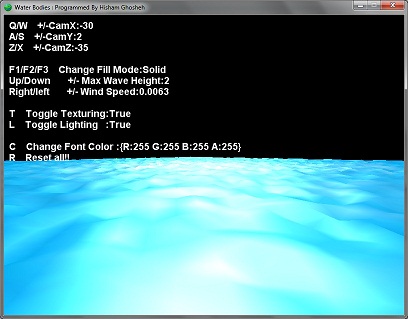
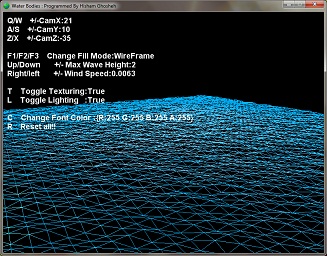
You can control several things in the application like enabling/disabling lighting and texture, changing camera position…
You can change the max wave height,wind speed and the application will automatically randomize the waves!
WaterBodies Executable ( 144 KB ) – XNA Redistributable 3.1 Required ONLY if you don’t have XNA Game Studio 3.1 installed
WaterBodies Source Code ( 183 KB ) – XNA Game Studio 3.1 Required
Revisions:
rev. 1 : Position,Rotation,Scale properties are now available! the WaterBody class is now more flexible than before!
rev. 2 : Updated camera class, now it’s a free look camera. Code now is more tidy..


 Ghoscher's Blog