Archive
XNA Picking Tutorial Part II
Introduction:
Hello & welcome to the second picking tutorial!
1- Ray picking.
2- RTS style selection box (two approaches).
3- Projection and why you need it.
In part I, I talked about picking single objects, In many cases such as RTS games that’s not enough…
You’ll need to select multiple units together using some sort of a rectangle or selection box that you make by clicking and dragging with your mouse.
Two approaches I know:
1- Unprojecting your selection box and check for collisions in 3D world space.
2- Projecting your 3D objects and perform simple 2D rectangle collision detection.
First approach, Unprojecting a rectangle ( A little tricky ) :
If you unproject a point the result should be a ray ( Part I discussed this issue in some detail) , If you unproject a rectangle the result depends on your projection matrix, We’ll assume it’s a perspective projection matrix, so the result of unprojecting a rectangle is a frustum (BoundingFrustum in XNA), in most cases this BoundingFrustum is not a scaled version of the view frustum, it’s some sort of irregular frustum, images are better than words:

Click on image to see full size
Now how do we get this frustum? Read more…
XNA Picking Tutorial Part I
Introduction:
In the following three or four articles I’m gonna discuss XNA picking related issues including:
1- Ray picking.
2- RTS style selection box (two approaches).
3- Projection and why you need it.
I’m not an XNA professional so I might make some mistakes, please if you think any thing is wrong tell me and I’ll be happy to respond 😀
What is picking?
Well.. in short, picking is something you’ll need if you want to know what 3D object the mouse cursor is over! in other words picking lets you “pick” a 3D object with your mouse, if you have ever played a 3D RTS (real time startegy) game like C&C Generals, selecting a unit with you mouse is called picking!
In a 2D game knowing what’s the mouse is over – in most cases – is simple, just check if the mouse is inside a rectangle or a circle for example, in a 3D world it’s a little trickier!.
In a previous post I visualized how picking 3D objects works in XNA. (no need to check the old post, every thing you want is here…)
Today I’m gonna explain how the operation works, the official picking sample is great, and much of my explanation is taken from there…
Picking will be explained step by step in addition to some other picking issues…
1-Ray Picking:
A ray goes from a specified point towards a specified direction ( it doesn’t have an ending point).
XNA provides a Ray struct with some good intersection detection methods, you can check ray intersection against bounding volumes (BoundingBox, BoundingSphere, BoundingFrustum) and Planes.
The main idea of picking is to create a ray that goes from a point in the near plane of the camera frustum towards another point in the far plane of the camera frustum, these two points are specified using the mouse screen coordinates (mouse x and y), once we have that ray we can check for intersections with 3D objects using there bounding spheres for example..
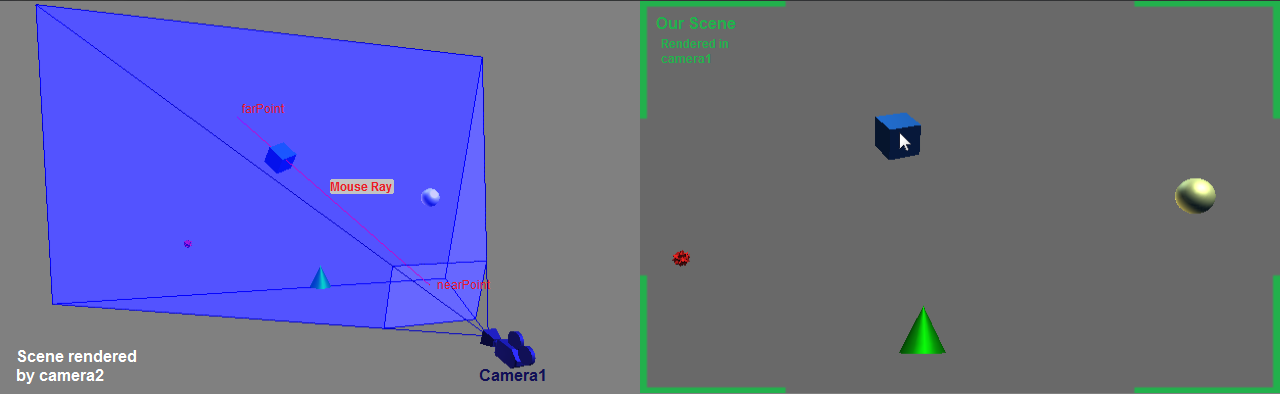
Click on image to see full size
Whenever you draw a 3D object to your 2D screen it has to be projected using the matrices world, view and projection, multiplying the 3D position of a vertex with these three matrices produces the 2D position of the vertex in the viewport. this operation is called projection, transforming from world coordinates to screen coordinates.
When picking we want to do the opposite : transform from screen coordinates (mouse position on the screen) to world coordinates, This operation Read more…
XNA Ray Picking Sample
Edit : The article is archived!, please refer to the my XNA Picking Tutorial
Hello! 🙂
This is a simple XNA 3.1 app that I wrote to demonstrate how picking 3D objects works :)…
Make sure you first check the official picking sample, you can find it here (XNA GS4).
Okay back to my app…
What makes my sample different is that you can actually see the camera frustum & the mouse ray, here’s a screen shot:

as you can see there are three viewports here:
1- Right : The main game scene, camera used : camera1…
2- Left : in this viewport the whole scene is rendered again and can be seen using a second camera (camera2), camera1 is visualized here, camera1 frustum, near/far planes and mouse ray are all rendered here so that you can see how picking works ;)…
3- Bottom : Instructions & info.
Both cameras are free look cameras similar to Counter-Strike free look cameras…
Here are the files:
RayPickingSample Executable
RayPickingSample Source
Revisions:
rev.1 : Fixed cam frustum bug where the tip of the frustum were stuck on some computers, fixed a typo.
Interested in programming details?
In this project you can find a free look camera class called Camera , there’s also a second camera class which is VisualCamera.
VisualCamera class inherits from Camera class and adds Read more…
3D Water Bodies
This is a simple XNA project that simulates an ocean…
The idea first came to me when I was practicing on creating terrain using heightmaps! I was playing with the vertices of the terrain, giving them some motion on the Y Axis then I said to my self: “Wow! This looks like the sea wavy water! :D”
The principle is simple! examine this very simple example:

I have 9 vertices forming 4 quads
I also have an array of 9 integers to determine the direction of each vertex : up/down
when first initializing the WaterBody, a random value between -n,n is assigned to the Y component of each vertex. so each vertex should start with a random Y component… The direction of each vertex is also generated randomly!
Now all I have to do – every frame – is to move each vertex in its direction, if Position.Y<-n or Position.Y>n then fix Position.Y and change the direction of the vertex ( if up make it down, if down make it up! pretty simple huh? 🙂 )
If you apply the above to a larger number of vertices ( I used 70×70 in my project ) you’ll have a nice wavy water!
Adding some lighting and texture will make things better ;).
Adding sound effects will make things even better! 😉 😉
Here’s the final result!
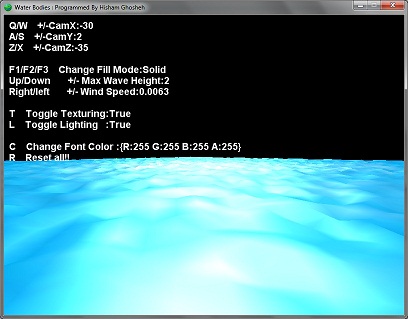
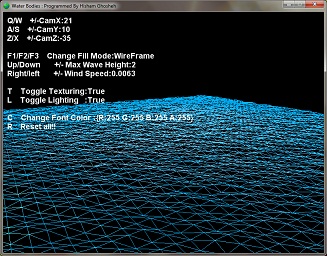
You can control several things in the application like enabling/disabling lighting and texture, changing camera position…
You can change the max wave height,wind speed and the application will automatically randomize the waves!
WaterBodies Executable ( 144 KB ) – XNA Redistributable 3.1 Required ONLY if you don’t have XNA Game Studio 3.1 installed
WaterBodies Source Code ( 183 KB ) – XNA Game Studio 3.1 Required
Revisions:
rev. 1 : Position,Rotation,Scale properties are now available! the WaterBody class is now more flexible than before!
rev. 2 : Updated camera class, now it’s a free look camera. Code now is more tidy..
Hanoi Towers
Hanoi Towers is a game where the objective is to move all discs from tower A To tower C BUT there are two simple rules :
- you can’t place a disc over a smaller one
- you can only move one disc at a time!

The problem can be solved using a recursive algorithm..
Actually my college partner Hashem Al-Rifai and I programmed this simulation for our college algorithms project
We used C++,OpenGL and SFML ( what a mixture 🙂 )
The reason we used SFML is because it makes working with windows,input and sound much easier, it saves you the trouble you might run into when using only OpenGL :D…
You can check Wikipedia for more information and algorithms…
Here’s our application:
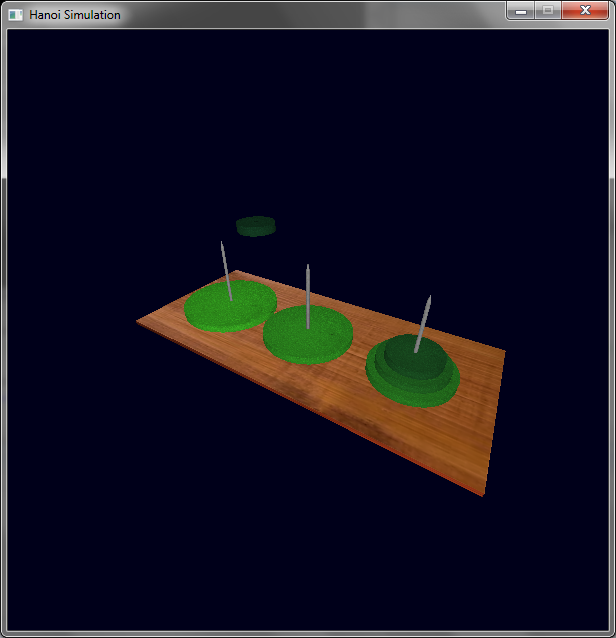
You can rotate the scene,add more discs
Press Tab for fast animation!
We added some cool mouse features! please read the console window for more details 🙂
You
You can add up to 18 dics 🙂 , you don’t wanna do that since it will take forever to solve! don’t you believe me? go ahead and try it 🙂
Hanoi Simulation Executable – SFML and OpenGL Required Dlls are included
Hanoi Simulation Source Code – SFML and OpenGL headers and libs are NOT included
Gokigen Naname
Gokigen Naname is a japanese puzzle where you have a grid…
some nodes on the grid has numbers from 0-4
each square on the grid should contain only on diagonal line
The number on each node (n for example) means that this node should have precisely (n) lines connected to it. the grid shouldn’t contain any closed loops!
For more details please refer to Wikipedia!
This “Game” solves the puzzle supplied by the user..so actually it’s not a game since the player won’t do the solving..

Click on any node with the left/right mouse button to increase/decrease its number…
The game is programmed using C++ and SFML
SFML is a powerful 2D Library but since C++ is a headache (at least for me :)) I prefer using XNA with C#
There’s also a .Net SFML library but I never tried it!
You’ll have to forgive me for a bug in my program 😦
When you want to change the value of a node, don’t click on the node! See the picture below

You have to click where the red circle is 😦 , The code is old now and as I said before C++ is annoying, that’s why I didn’t fix this problem and I wont!
Gokigen Naname Executable (718 KB) – Required SFML Dlls are included
Gokigen Naname Source Code (99.7 KB) – SFML Headers & Libs not included
Space Defender : A Complete XNA Game by Ghoshehsoft
Space Defender
Update: Game updated to XNA GS4.0 , Download links added!
This was my first XNA game! It’s a cool 2D Game..
Unlike most space games, this game takes place in the atmosphere! not in the outer space 🙂
You have to defeat the invaders as they increase in number, you’ll also come across mother ships which are more advanced enemies that will chase you and fire energy pulses at you!. Play for some time and you’ll confront the Main Mother Ship…you think you’re up to it???
You have two weapons to stop your enemies : a rail gun that will fire small rapid bullets , and a missile launcher that fires missiles causing massive damage to your enemies!
The player can choose one of three Space Ships to play the game with… each space ship has it’s special ability : Rapid Fire, Turbo Ship, Heavy Armor…and if the player beats the game twice with two different ships, The ultimate ship will be unlocked!
You can play the game with your mouse ( I like to sit back and destroy the invaders just with my mouse 😀 ) OR with your keyboard
Instructions on how to play the game can be found under the How To Play window in the game.
Taking the repairs box is always a good idea!! a small white repairs box will show up from time to time! take it to regain health.
You can control the speed of your ship in the game, See How To Play for more instructions
Enough Talk! Let’s Play!
Download The Full Game Executable XNA 3.1
Download The Full Game Executable XNA 4.0
Full source code link at the bottom of the article
If you don’t have the XNA 3.1 SDK installed on your computer, you’ll have to install the XNA Redistributable 3.1, download it here for free.
If you like the game please let me know! my email is hisham.ghosheh@gmail.com
Some images of the game:


For XNA Developers:
Let’s talk a little about the game code & structure…
I programmed this game using XNA Game Studio 3.1 & C# 2008


 Ghoscher's Blog