Archive
Building an offline map app for Android
Hello there :), this tutorial series is about building a very simple map application for Android from scratch and without using Google™ APIs
(Don’t get frightened by the scroll bar of your browser 😀 the comments made this post look long 😀 )
The main app features will be:
- Displaying a map stored in a database on the SDcard, in other words : offline* map, no internet connection is required (but easy to implement online functionality).
- User can touch control the map (Panning), zoom in\out using volume keys.
- A marker will be displayed on the map depending on the user’s GPS position.
*Update 16/8/2012: online maps are now supported in tutorial part 6
as mentioned before : we’re not going to use Google™ APIs.
As you can see the app will be simple, other more complex functions can be added later.
Q: Why not use Google™ maps APIs (eg: MapActivity)?
A: it requires a working internet connection.
A: you might want to write your own classes.
A: you might want to know how things work.
Q: Aren’t there free map apps on the Android Market?
A: Yes there are and they are really good ones, Locus Free, RMaps, Orux Maps, these apps can run with both online and offline modes, I mainly use Locus Free, but I like writing my own apps and learn new things.
before starting this tutorial I’ll show you the final result, so that you can decide whether to continue reading or not
The app and the tutorials target API Level 7 as a minimum SDK (That’s Android 2.1 )
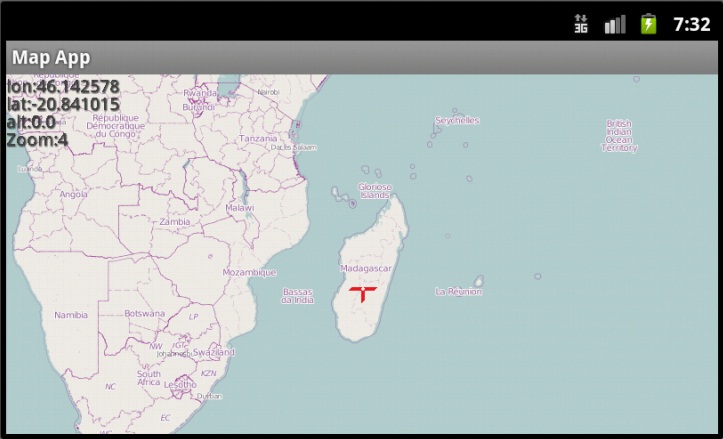
A screenshot from the emulator
(I’m not really in Madagascar, just picked a random point :P)
Here’s the source code (Eclipse Project) and the apk file, after you install it on your device\emulator, copy this map file world.sqlitedb to your /sdcard/mapapp/ (You’ll need to make the folder yourself).
Read more…


 Ghoscher's Blog